Power Station Runtime & Sizing Planner
My power plan
Inputs
6 sectionsEquipment library
Choose a preset or add your own equipment.
Example watts — edit to match your equipment.
64 matching items · All presets use AC input initially.
Selected equipment
No equipment added.
Setup
Planning window
Leave equipment usage blank to use the full window. For a brief session, enter its duration in hours.
Power station
Station output ratings (optional)
Watt ratings alone cannot establish equipment compatibility.
Use nominal stored energy. Already measured usable output energy is not supported by this model.
Assumptions
10% reserve · 85% AC efficiency · 10% extra capacity margin
Edit charge window and losses
These defaults are editable assumptions. Reserve defines the lower charge limit; no second depth-of-discharge reduction is applied.
Solar recharge
Panel yield, input limit and charging losses
Illustrative assumptions. Separate panel yield from losses between the input and battery.
Plan a complete portable power setup
Build the load list, size stored energy, check output demand and estimate solar replenishment in one plan.
Use the complete planner when one decision depends on several limits. A station needs enough stored energy for the schedule, enough output for equipment that overlaps, and a realistic way to replace the energy if the plan includes solar.
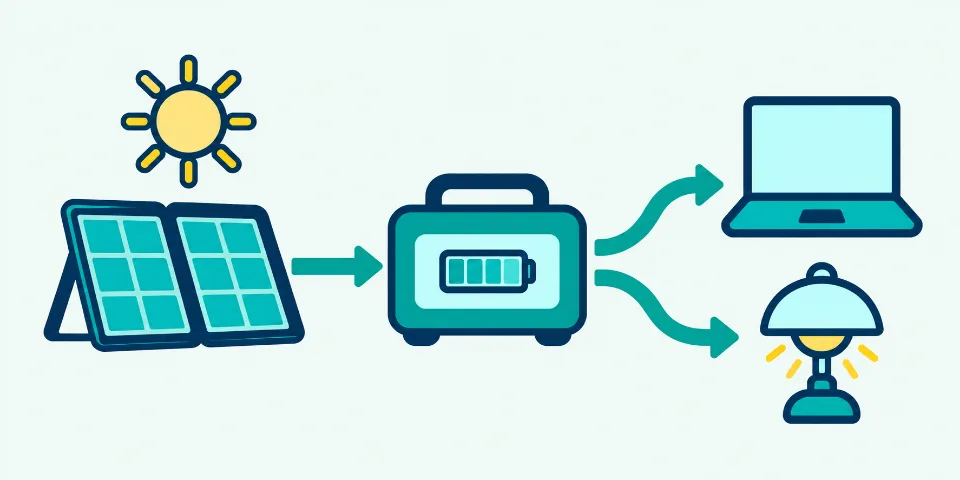
Find the first constraint to fix
Read the plan as four separate decisions. Correct a failed output or energy check before comparing products, then decide whether the recharge target fits the way the station will be used.
- Stored energy is short
- Reduce optional watt-hours, shorten the schedule or compare stations above the calculated nominal-capacity target.
- Continuous or startup output is short
- Reduce planned overlap or compare a station with the required output rating. Extra battery watt-hours do not correct an inverter limit.
- Solar replenishment is too slow
- Test a smaller charge window, improve the yield assumption only when justified, or add compatible panel power up to the station input ceiling.
Before keeping the plan
- Keep one location, schedule and charging method in each named plan.
- Measure the largest example-wattage loads first.
- Enter the station capacity, continuous output, surge output and solar-input limits.
- Save an essentials-only comparison before adding convenience loads.
Method, formulas and verification
Understand the calculation path, the strongest inputs and the limits to verify.
- Equipment schedule
Watts, hours, duty and overlap
- Station size
Capacity, continuous W and startup W
- Runtime
Available Wh divided by repeating demand
- Solar recharge
Energy restored through useful panel power
Trips, field work and short outages
Model the equipment that will share one portable station during a defined period. Typical plans include campsite lighting and refrigeration, laptops and network equipment for mobile work, cameras and chargers for field production, or selected household loads during a short outage. Make separate plans when the equipment, schedule or available charging changes.
Separate equipment that behaves differently
Create separate rows for two laptops with different input power, or for the same appliance used for different lengths of time. Quantity is useful only when identical units share watts, usage, duty cycle, output path and startup demand. Switch a row off to compare the same plan with and without that load.
Treat capacity, output and recharge as three decisions
Battery watt-hours answer how much energy can be stored. Continuous and startup watts answer whether the station can supply the load. Solar input and equivalent sun hours answer how quickly energy may be restored. Passing one check does not establish the other two, and connector or voltage compatibility still needs a product-specific check.
Scheduled equipment energy
Average W × quantity × usage hoursEach row may use the full planning window or its own shorter duration.
Capacity with planning margin
(Battery Wh ÷ usable fraction) × (1 + margin)Conversion losses and overhead are applied before reserve and retention.
Solar replenishment
Energy to add ÷ stored solar powerPanel yield, station input limit and charge efficiency constrain stored power.
What changes the result most?
Change one input at a time and keep the measurement or specification that supports it.
| Input | Effect on the answer | What to verify |
|---|---|---|
| Equipment hours or duty cycle | Changes scheduled energy and the required battery capacity. | Record a representative day instead of the longest possible use. |
| Simultaneous equipment | Changes continuous and startup output requirements. | Mark a row as separate only when the operating plan prevents overlap. |
| Reserve, retention and efficiency | Change usable energy and runtime without changing appliance watts. | Use the station manual or a measured end-to-end result. |
| Panel yield and solar-input limit | Change recharge time and may make extra panel watts ineffective. | Confirm site conditions and the station PV input range. |
Common terminology
- Power station
- portable battery, solar generator
- Equipment list
- load list, appliance list
- Startup output
- surge watts, peak watts
- Solar input limit
- PV input ceiling, charge-input limit
Common mistakes
- Treating one total as the answerCapacity, continuous output, startup output and recharge time are separate constraints.
- Mixing different days in one planKeep one schedule and one charging situation in each saved plan.
- Leaving every example wattage unchangedMeasure the loads that dominate energy or output before comparing products.
Build one load list for one operating plan
Add only equipment that may share the same portable station, location and planning window. Keep unlike devices on separate rows so their watts, hours, duty, output path and startup demand remain visible. Catalogue wattages are examples for building the scenario; replace the loads that dominate energy or output with a representative measurement or an exact manufacturer rating before choosing equipment.
Give every load a time and a priority
The planning window is the total period the plan must cover, while each equipment row may use all or part of that period. Enter shorter sessions rather than charging every device for the whole trip or outage. Mark comfort loads Optional when they can be removed, then compare the complete schedule with an essentials-only case without rebuilding the equipment list.
Read capacity, output and recharge independently
The planner deliberately produces three kinds of answer. Nominal watt-hours cover scheduled energy, continuous and startup watts cover simultaneous electrical demand, and equivalent full-sun time covers replenishment. A station must pass every relevant requirement; surplus battery capacity cannot correct an inverter limit, and a fast solar estimate does not establish panel compatibility.
Describe cycling and overlap in the shared scenario
For refrigerators, pumps and other cycling loads, combine running watts, duty cycle and off-cycle watts instead of assuming full power all day. If a row already contains a measured time-average, keep duty at 100% so the average is not reduced again. Equipment may overlap unless a row is explicitly marked Runs separately; use that exception only when the operating plan prevents simultaneous use.
Resolve startup demand before comparing a station
Enter startup watts for active AC motors or compressors when the value is known. The planner checks the largest row-start event against the other running loads instead of adding unrelated peaks automatically. Missing startup data remains a visible requirement, because a complete energy budget cannot prove that an inverter will start the planned equipment.
Keep an explainable snapshot of the whole plan
Save a named browser-local plan for each distinct trip, outage or work session, and export JSON when a portable record is needed. Copied and printed results include the active assumptions so capacity, runtime and recharge figures can be reviewed later. Saved projects stay in this browser and can disappear when its site data is cleared; they are never used to generate public page content.
Complete planning examples
Three common plans checked across scheduled energy, output and solar replenishment.
One plan, three independent requirements
Each scenario keeps its equipment schedule, battery assumptions and solar inputs together. The engine calculates the capacity target, simultaneous AC demand and equivalent solar recharge time separately so one passing result cannot hide another constraint.
FULL WORKED CALCULATION
Remote workday
One 65 W laptop for 6 h, one 30 W monitor for 6 h and a 12 W router for the full 8 h planning window.
- 1Scheduled equipment energy
- 2Required capacity with margin
- 3Continuous AC output
- 4Repeating-load runtime
- 5Equivalent solar recharge
The capacity result covers the timed work schedule, while the runtime result treats the same load pattern as repeating continuously. The solar result answers a third question: how much equivalent full-sun energy is needed to restore the selected battery percentage window.
Measure the laptop at its representative workload, confirm whether the monitor and laptop overlap, and check the station’s continuous, startup and solar-input specifications.
CALCULATED EXAMPLE 1
Field production shift
A 90 W editing laptop for 5 h, two 18 W camera chargers for 3 h and a 12 W LED panel for 4 h.
- Equipment energy
- 606 Wh
- Capacity with margin
- 931.68 Wh
- Continuous AC output
- 138 W
- Solar recharge
- 3.56 sun h
Separate charger quantity from laptop power so changes to either input remain easy to audit.
CALCULATED EXAMPLE 2
Short outage essentials
A 12 W router for 10 h, two 9 W lamps for 5 h and a 35 W fan for 6 h.
- Equipment energy
- 420 Wh
- Capacity with margin
- 603.92 Wh
- Continuous AC output
- 65 W
- Solar recharge
- 3.57 sun h
This example keeps optional comfort loads visible instead of hiding them inside one total wattage.
CALCULATED EXAMPLE 3
Weekend camping setup
A 45 W compressor cooler for 12 h at 35% duty, two 9 W lights for 5 h and four phone charges at 15 W for 2 h.
- Equipment energy
- 422.4 Wh
- Capacity with margin
- 643.1 Wh
- Continuous AC output
- 123 W
- Solar recharge
- 4.44 sun h
The cooler is the sustained essential load; lighting and charging remain visible as adjustable rows.
More common calculations
Calculated by the same engine as the tool.
| Scenario | Entered plan | Calculated answer |
|---|---|---|
| CPAP overnight plan | A 40 W CPAP machine for 8 h, a 5 W phone charger for 2 h and one 4 W night light for 8 h. | Equipment energy: 362 Wh · Capacity with margin: 585.59 Wh · Continuous AC output: 49 W · Solar recharge: 3.89 sun h |
| RV overnight essentials | A 40 W diesel-heater electrical load for 10 h at 50% duty, a 20 W water pump for 1 h and 24 W of lights for 4 h. | Equipment energy: 326 Wh · Capacity with margin: 496.33 Wh · Continuous AC output: 84 W · Solar recharge: 3.17 sun h |
| Refrigerator overnight | A 120 W refrigerator for 8 h at 33% duty, with 5 W off-cycle power and a known 600 W startup input. | Equipment energy: 343.6 Wh · Capacity with margin: 551.23 Wh · Continuous AC output: 120 W · Solar recharge: 4.44 sun h |
| Internet and phone backup | A 12 W modem, 10 W Wi-Fi router and two 15 W phone chargers cover a 12 h communications window. | Equipment energy: 354 Wh · Capacity with margin: 538.96 Wh · Continuous AC output: 52 W · Solar recharge: 3.97 sun h |
| Television and lighting evening | An 80 W television for 4 h, three 9 W LED lamps for 5 h and a 12 W router for 6 h. | Equipment energy: 527 Wh · Capacity with margin: 802.35 Wh · Continuous AC output: 119 W · Solar recharge: 4.46 sun h |
| Outdoor projector night | A 180 W projector for 3 h, a 40 W speaker for 3 h and two 9 W lights for 4 h. | Equipment energy: 732 Wh · Capacity with margin: 1,125.4 Wh · Continuous AC output: 238 W · Solar recharge: 4.44 sun h |
Calculated reference table
All rows use 85% AC efficiency, a 100–10% battery window, 100% retained capacity, a 10% sizing margin, 80% panel yield and 90% charging efficiency.
| Scenario | Inputs | Engine result |
|---|---|---|
| Internet backup | 12 W router + 10 W modem for 8 h; 500 Wh battery; 100 W solar | Capacity: 253.07 WhRuntime: 17.39 hSolar: 4.17 h |
| Portable office | 65 W laptop + 30 W monitor for 6 h; 1,000 Wh battery; 240 W solar | Capacity: 819.61 WhRuntime: 8.05 hSolar: 3.47 h |
| Cycling cooler | 45 W cooler at 35% duty for 12 h; 750 Wh battery; 200 W solar | Capacity: 305.41 WhRuntime: 32.42 hSolar: 3.13 h |
| Outage essentials | 120 W cycling refrigerator + 12 W router for 12 h; 1,000 Wh battery; 300 W solar | Capacity: 965.41 WhRuntime: 13.67 hSolar: 2.78 h |
These are illustrative planning inputs. Replace equipment watts, schedules, battery limits and solar assumptions with values for the actual situation.
Questions when building a complete power plan
Decide what belongs together, how to compare scenarios and what the result cannot select for you.
What should go in one complete power plan?
Include equipment that may use the same station under the same schedule and charging assumptions. Create another named plan for a different day, location, season or load priority so the comparison remains understandable.
What size portable power station do I need for an appliance list?
The answer needs three specifications: nominal battery capacity in watt-hours, continuous output in watts and startup output when equipment has a surge. The complete plan also shows how long the entered battery may run the load and how much solar energy is needed to restore it.
Can battery size, runtime and solar charging be calculated together?
Yes. The complete plan uses one equipment list and one set of battery assumptions, then keeps station sizing, repeating-load runtime and solar recharge as separate results so each constraint remains visible.
How do I compare essential and optional equipment?
Mark convenience loads as optional, then switch the result between all active equipment and essentials only. The comparison reports the capacity reduction and, when available, the runtime gained by removing optional loads.
Why can a battery have enough energy but still fail the plan?
Battery watt-hours describe stored energy. The inverter and ports must also supply the simultaneous running watts and any startup event. A larger battery label does not automatically provide a higher output rating.
How should I plan a refrigerator, router and lights during an outage?
Keep each load on its own row, enter the router as continuous, give lights their expected hours and use a measured refrigerator duty cycle or average input. Add refrigerator startup watts when known.
Does this planner size a diesel generator?
No. It models stored electrical energy, inverter output and solar replenishment for battery power stations. It does not calculate engine loading, fuel consumption, generator derating, maintenance or exhaust requirements.
Can this calculation certify medical or emergency backup?
No. It provides an equipment energy budget. Critical-power continuity, device suitability, transfer equipment, alarms, redundancy and installation requirements need an equipment-specific professional assessment.
How we validate this calculator
Power Planning Model v1 · 48 saved checks · reviewed 14 September 2026.
MODEL CHECK
A result you can reproduce
We run 48 saved examples, edge cases and combined checks before release. Each modeled relationship is mapped to an official primary source and at least one saved scenario. When we compare a published example, we first use the same inputs and assumptions.
- Status
- Desk-validated
- Saved cases
- 48
- Property checks
- 10,000
- Reference oracle
- Independent exact arithmetic
Three-engine integration check
The capacity, repeating-runtime and solar components are checked separately, then exercised together so one plan cannot silently use inconsistent assumptions.
- Inputs used
- 22 W AC load; 8 h schedule; 500 Wh battery; 85% AC efficiency; 10% reserve; 10% margin; 100 W solar; 80% panel yield; 90% charging efficiency.
- Expected result
- 253.07 Wh capacity recommendation; 22 W continuous output; 17.39 h repeating runtime; 4.17 equivalent sun hours for the selected recharge window.
U.S. Department of Energy — power and energy reference · NREL Energy Basics — dimensional reference · Jackery — portable power-station runtime method · EcoFlow — charging-time relation
Desk-validated means the documented arithmetic, exact boundaries and model invariants reproduce the stated results. It does not certify a product or predict weather, battery condition or field performance.
Sources and model limits
References used by this page, what is calculated and what still needs a specification or measurement.
Reviewed 14 September 2026. These references support the terminology and methods. Equipment presets and default efficiency values are examples, not facts about every product.
Technical references
- NREL Energy Basics — power and energy dimensions
Pages 3, 4 and 11 state E = P × t, P = E ÷ t and electrical P = V × I. This validates dimensions, not equipment performance.
- US Department of Energy — Energy Efficiency in the Home
Background on appliance electricity use. Historical educational material, not a current equipment catalogue.
- Victron — Inverter technical specifications
Shows why efficiency, idle demand, temperature and surge duration are separate specifications. Its product values are not universal defaults.
- Jackery — Watt-hour and battery ratings
Reference for energy units and the nominal-voltage requirement when starting from amp-hours. No product recommendation.
- National Laboratory of the Rockies — PVWatts
Context for solar losses and uncertainty. This tool uses a simpler local energy-budget model; it does not call or reproduce PVWatts.
Included in this result
- Scheduled equipment energy and AC/DC conversion losses
- Continuous and one-row-at-a-time startup demand
- Repeating-load runtime and equivalent solar recharge time
Not modelled
This complete-plan model does not simulate an hourly load schedule, simultaneous solar use, battery temperature or chemistry curves, charging taper, startup duration, apparent power or product compatibility. Treat each result as a planning requirement to verify against the actual station, equipment and charging system.